Lynea
Case study: AI travel agency for groups

Lynea is a group travel planner for iOS and Android. Everyone in the group joins the trip from their own device and tells Lynea agent what they want. An AI agent takes all of it and works out one plan the whole group can agree on. It’s my senior capstone project at the University of Cincinnati, and I’m presenting it with my team at the UC IT Expo in April 2027.
- Product
- Lynea (cross-platform app)
- My role
- Team Lead & Product Designer
- Timeline
- Sept 2026 – Apr 2027
- Skills
- Product design, Figma, User flows, Wireframing, Team leadership
- Team
- Me as team lead and product designer, 2 software engineers and a cybersecurity architect
Problem: Group trip planning is always a mess
Planning a trip with friends usually starts with excitement and ends in a group chat with hundreds of messages and no decision. One person wants the beach, another one wants a city, while the third one wants to go hiking. Budgeting is also a huge issue, as well as everyone’s availability. And when all members finally agree, they realize that flights are on one site and hotel stays are on three others, so the search starts all over again.
I’ve personally experienced this issue lots of times since I travel a ton. This idea came to me pretty quickly during our team brainstorm, and we ended up sticking to it.
We’re building for friend groups in their 20s and 30s, college students, and groups planning around an event like a bachelor or bachelorette trip.
Competitive Analysis
We started by looking at what’s already out there and found Wanderlog and TripIt. Both are pretty good at what they do, but neither is really built for a group that has to decide together.
- Made for one plannerBoth apps assume one person organizes the trip and everyone else follows along. That’s exactly the “planner friend” problem, just moved into an app.
- None of them merges what people wantYou can share an itinerary, but nothing takes five people’s budgets, dates and must-dos and works out where they overlap.
- The AI is shallowWhere AI shows up, it writes a generic itinerary for a destination. It doesn’t know the group, and it doesn’t negotiate between them.
Features (MVP)
We decided to do things a little different here. Instead of one person collecting everyone’s wishes and doing the math, each person talks to an AI agent on their own, and the agent then finds the plan that works for the entire group.
- Join with a link
- Talk to the agent directly
- One plan from everyone’s wishes
- Flights and stays in one place
User Personas
Every group trip has different kinds of people, we picked those two common ones: the person who plans everything and ends up stressed out, and the laid-back one who just wants to show up. Our app has to work for both kinds of people, so we dived down on them. They’re early drafts based on our own trips and our target groups, and we’ll be updating them after our user interviews.

Maya
The always stressed-out planner
- Age
- 21
- Who they are
- College junior, organizes spring break for her 6 closest friends
- Role in the group
- Does the research, makes the spreadsheet, chases everyone for answers
- Goals
- Plan a trip everyone actually enjoys
- Frustrations
- Nobody answers until the last minute. 50 different Chrome tabs open to look for flights, hotels, and plan what to do
- Budget
- Tight, every dollar counts
- What Lynea gives them
- The agent collects everyone’s answers, so she stops chasing people. Flights and stays in one place
Jordan
The laid-back a.k.a. plan-everything-for-me friend
- Age
- 28
- Who they are
- Works full-time, part of a friend group planning a bachelor trip
- Role in the group
- Wants to go, but checks the group chat every other day at most
- Goals
- Know when, where and how much, then get on with his day
- Frustrations
- 300 unread messages. Finds out the plan last, and the price surprises him
- Budget
- Comfortable, but hates surprise costs
- What Lynea gives them
- A quick chat with the agent on his own time, then a vote instead of a debate
User Flow + Lo-fi Wireframes
Status: done for the main flows
Before opening Figma, I sketched the main flows by hand. It let me work out the flow before thinking about actual design system.
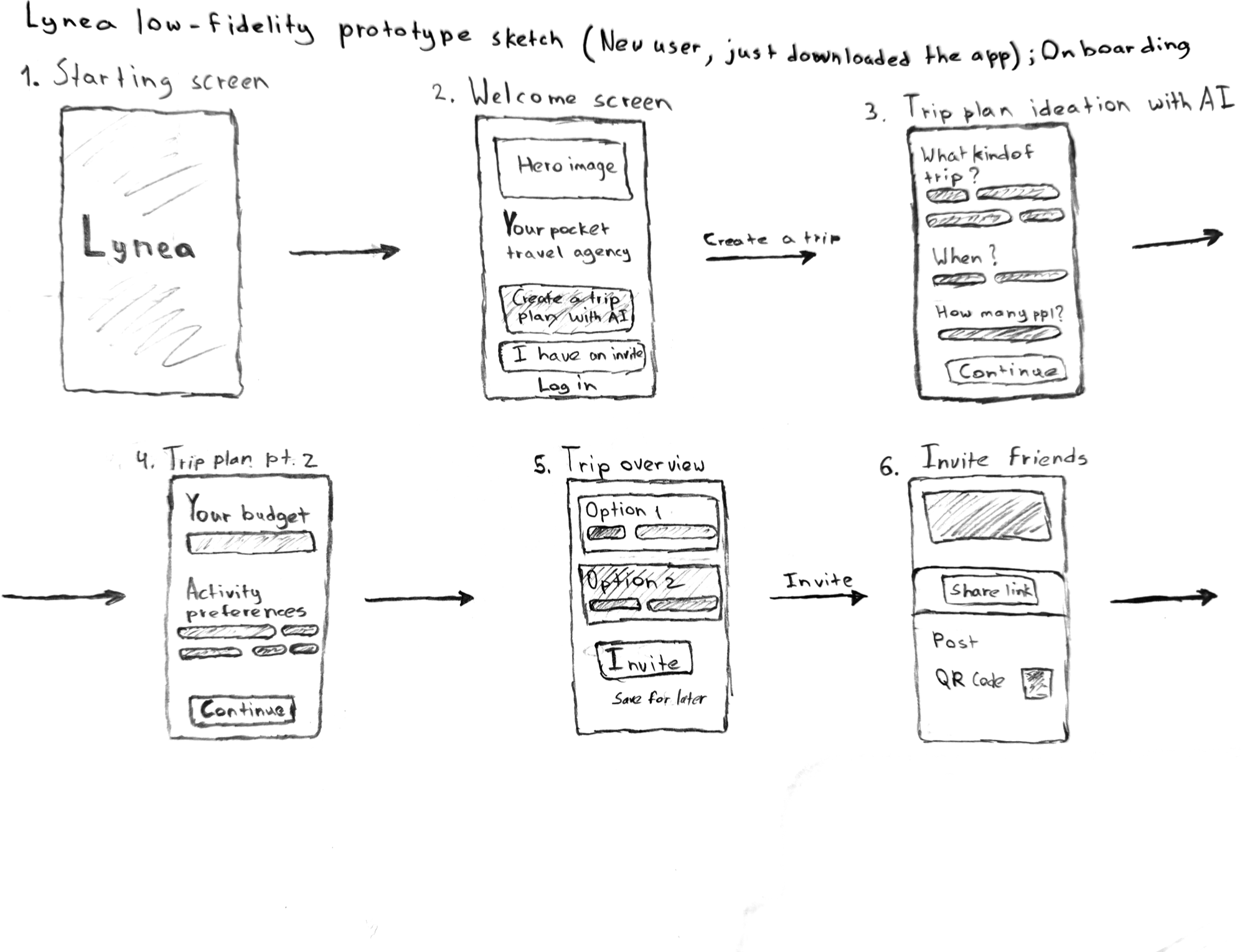
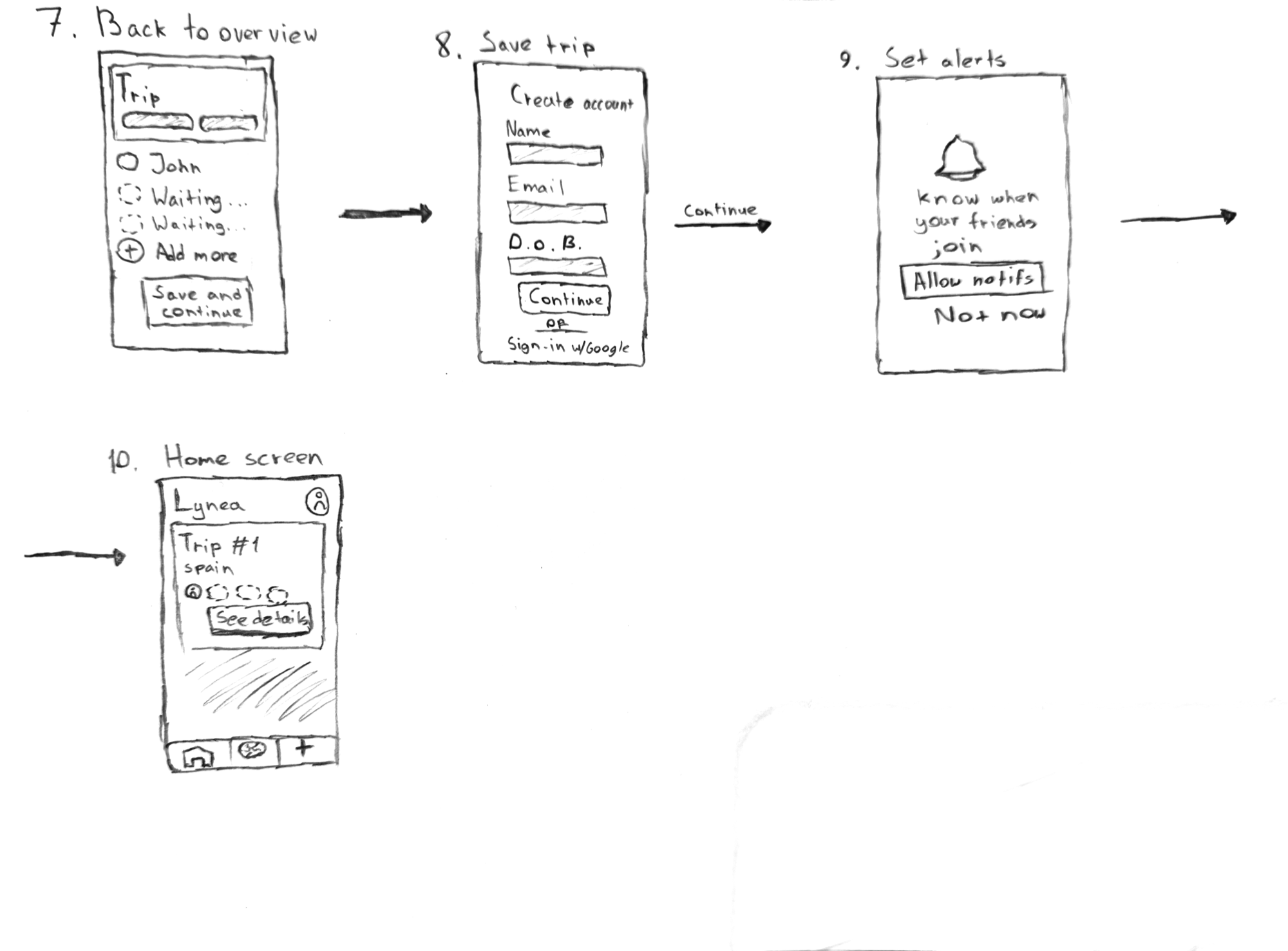
Where it stands
Lynea is a work in progress, and I will update this page monthly to show where we’ve gotten so far. Here’s where we are as of now.
- CompletedTeam contract, topic ideation, scope, system architecture design, brand and logo, and the first wireframes and user flows.
- This month (October)Finish all lo-fi wireframes, run our user research, and get about half of the high-fidelity screens done in Figma.
- By April ’27The fully functioning app, presented at the UC IT Expo.