
Polka
A macOS app that turns the MacBook notch into a little shelf for files, links, pictures and text
v1.0 released
Polka is a personal project I designed and built from scratch: a native macOS app that lives in the MacBook notch. Move your pointer to the notch and a shelf opens, where you can keep files, folders, links, pictures and text, then drag them back out into any app. It was also my first time building a macOS app, and my first real project engineered with Claude Code. Polka went from an empty Xcode project to v1.0 in about a week, and it’s free and open source on GitHub.
- Product
- Polka, a native macOS app
- My role
- Product Designer and Developer
- Timeline
- November 2026
- Skills
- Product design, Prototyping, Swift, SwiftUI, AppKit, AI-assisted engineering
- Team
- Just me, with Claude Code as my engineering partner
Problem: My files lived on the Desktop, my links lived in a dozen tabs, and I could never find either when I needed them
Every time I’m in the middle of something, my files end up scattered across the Desktop, next to a pile of screenshots I forgot to delete, and my links get lost somewhere among a dozen browser tabs. Then, right when I actually need them, for example when I’m applying to jobs and need my resume, cover letter and portfolio link all at once, I can’t find them right away.
I’d end up searching Finder, scrolling through my browser history, or just downloading the same file again. It’s a small thing, but it gets frustrating fast, especially when you’re doing it ten times a day. Meanwhile, the notch at the top of my screen was always there and never did anything.
Research
Before designing anything, I checked whether the idea was even possible on macOS, and what already existed in the notch.
- Notch apps exist, but the shelf is a side featureOpen-source apps like NotchDrop and Boring Notch already prove that the notch can hold files. But in most of them the shelf is temporary storage or one feature among music controls and calendar widgets. Nothing was built around the shelf itself, with links and permanent items.
- The hard part is the drag, not the shelfShowing a panel on hover is easy. Catching a drag the moment it starts anywhere on the screen, and opening the shelf before the pointer even reaches the notch, is where most of the risk was.
- It has to stay out of the wayA shelf that steals focus, covers the menu bar or opens by accident would be more annoying than the Desktop mess it replaces.
“I don’t need another app to organize my files. I need one place to put them for a moment and grab them again.”
Solution: A shelf in the notch, designed in Figma first and engineered with Claude Code
Polka turns the notch into a little shelf. Move your pointer to the notch and the shelf opens. Drag in anything you want to keep handy, and drag it back out into any app whenever you need it. The goals for v1 were simple:
- Reach any stored item in about two seconds
- Drag in from Finder, browsers and other apps with no setup
- Drag out into any app that accepts files or links
- Stay out of the way: no focus stealing and no accidental opens
Designing it in Figma first
As a designer, I started where I always do: in Figma. I designed a mock-up of the shelf and mapped out each of its states: closed, open, and ready to catch something you’re dragging toward it.
Then I turned it into a prototype to see how opening, dropping and dragging would actually feel, and adjusted the sizes, timing and details until the shelf felt like a natural part of macOS rather than an extra window on top of it. That way I knew exactly what I wanted to build before writing a single line of code.
Hover to open, drag to catch
The shelf opens after a short pause on the notch, so passing the pointer by on the way to the menu bar doesn’t trigger it. When you start dragging a file or link anywhere on the screen, the shelf opens on its own as a drop zone, and a pair of eyes watches your pointer and blinks until you let go.

A shelf that works like Finder
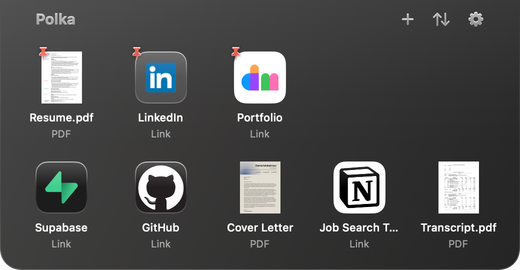
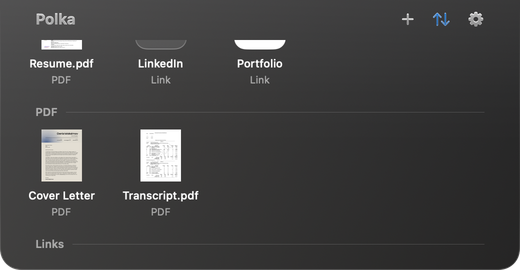
Items sit in a grid that feels familiar: move them around like apps on an iPhone, sort them by name, kind or date like a Finder window, or pin up to five to the top row. Right-click any item to rename it, preview it with Quick Look, share it with AirDrop, or convert a document to PDF. Removing an item turns it to dust, an animation inspired by Telegram.
Your files never move
Polka remembers where your files are instead of copying them, so your originals stay where they are and Polka even follows them if you rename or move them later. If a file gets deleted, its item shows as unavailable instead of quietly disappearing. For things you want to keep safe, Keep a Copy saves Polka’s own copy, and Temporary removes an item after 24 hours. New screenshots can go straight to the shelf, too.
Color, transparency and glass
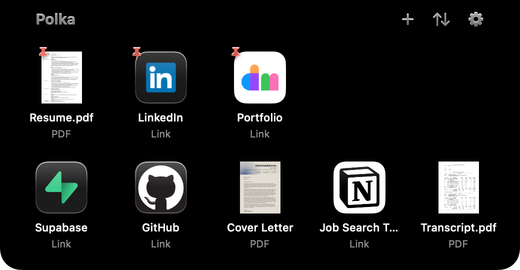
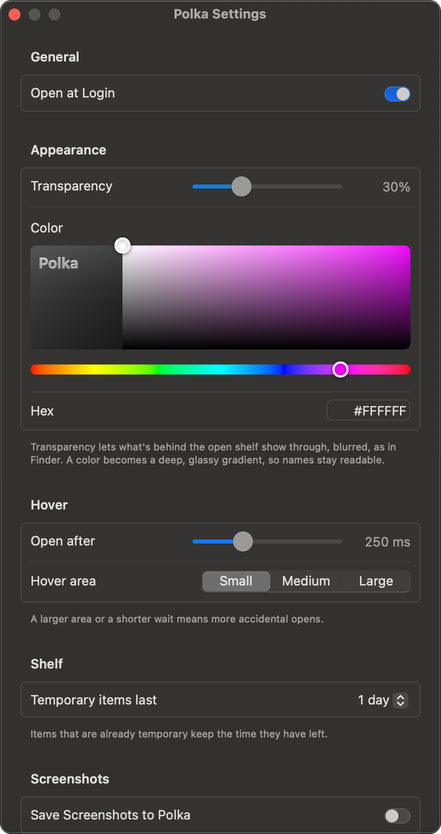
The open shelf can be solid black or see-through glass that softly blurs your desktop, like the Finder sidebar. You can tint it any color from a color picker or a hex code, and Polka turns it into a deep, glassy gradient so the names on the shelf always stay easy to read. On a Mac without a notch, Polka shows a small dark bar at the top of the screen instead.
Engineering it with Claude Code
For the engineering side, I decided to dabble with Claude Code and build a native macOS app for the first time. I wrote a PRD, split the work into milestones, and built Polka step by step with Swift, SwiftUI and AppKit, testing every piece on my own Mac along the way. Every change went through its own branch and pull request, so the main version always worked.
The trickiest part was making the notch catch a drag the moment it starts anywhere on the screen, without ever stealing focus from the app you’re working in. My first version of the drop zone didn’t accept drops at all, because the system tried to give the shelf focus and the shelf refused. Switching to a lower-level way of receiving drops fixed it, and kept the shelf from ever taking focus.
Private by design
Everything stays on your Mac, with no accounts and no cloud. Link previews never reach into your local network, and nothing you put on the shelf ends up in the app’s logs.
Impact: Designed, built, shipped, and my Desktop is finally clean (mostly)
There are no download numbers to share yet, since Polka was built for me first. What I can say is that it went from an idea and a Figma prototype to a released v1.0 in about a week, and it’s now the first place I drop a file instead of the Desktop. Along the way I delivered a PRD, a Figma mock-up and prototype, a native macOS app, a user guide in the README, and a free, open-source release under the MIT license. I’m planning to keep improving it, so feature ideas are always welcome.
Try it: download Polka from the Releases page on GitHub.